Many users in the Philippines want to know how to transfer GCash to PayMaya for online payments, shopping, and wallet balance management. While both are popular e-wallets, transferring money between them is not direct.
In this guide, you’ll learn how to send money from GCash to PayMaya safely, the requirements, fees, and what to do if the transfer fails.
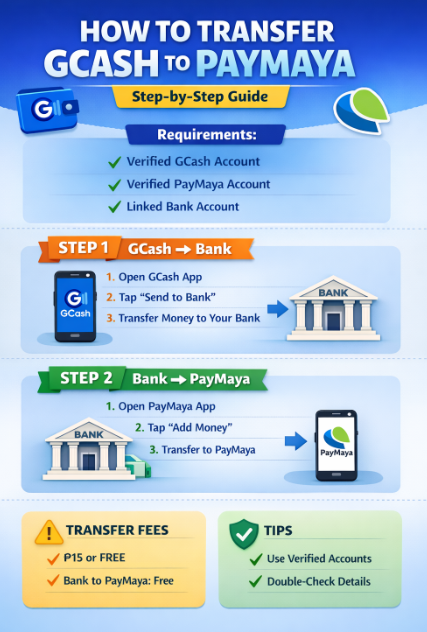
Can You Transfer GCash to PayMaya Directly?
❌ No, GCash does not support direct transfers to PayMaya.
However, ✅ you can transfer GCash to PayMaya using a bank as a middle step. This method is legal, safe, and commonly used.
Requirements Before Transferring GCash to PayMaya
Before you start, make sure you have:
- ✔ Fully verified GCash account
- ✔ Fully verified PayMaya account
- ✔ A bank account supported by both apps
(Example: BPI, UnionBank, RCBC, or other supported banks) - ✔ Stable internet connection
How to Transfer GCash to PayMaya (Step-by-Step)
Step 1: Transfer Money from GCash to Bank
- Open GCash app
- Tap Send Money
- Select Send to Bank
- Choose your bank
- Enter:
- Bank account number
- Account name
- Amount
- Confirm the transaction
💡 GCash bank transfers are usually free or have minimal fees.
Step 2: Transfer Money from Bank to PayMaya
- Open PayMaya app
- Tap Add Money
- Select Bank Transfer
- Choose the same bank used in GCash
- Enter the amount
- Confirm
✅ Money will reflect in your PayMaya wallet within minutes (or same day).
Alternative Method: GCash to PayMaya via ATM
You can also use an ATM if online banking is not available:
- Send money from GCash to your bank
- Withdraw cash from ATM
- Deposit cash to PayMaya-supported bank
- Transfer to PayMaya wallet
⚠️ This method may involve extra fees.
GCash to PayMaya Fees
| Transfer Type | Fee |
|---|---|
| GCash to Bank | Free – ₱15 |
| Bank to PayMaya | Usually Free |
| ATM Withdrawal | ₱10 – ₱20 |
💡 Fees may vary depending on the bank.
How Long Does GCash to PayMaya Transfer Take?
- GCash to Bank: Instant to same day
- Bank to PayMaya: Instant to few hours
- Weekends/Holidays: May take longer
Common Issues & Fixes
GCash to PayMaya Not Working?
Try these fixes:
- ✔ Make sure both accounts are fully verified
- ✔ Check correct bank details
- ✔ Ensure sufficient balance
- ✔ Update both apps
- ✔ Try during banking hours
Transfer Failed but Amount Deducted?
- Wait 24 hours
- Check transaction history
- Contact GCash or PayMaya support
Is It Safe to Transfer GCash to PayMaya?
✅ Yes, it is safe if you use official banking channels.
❌ Avoid third-party apps or agents.
FAQs
Can I send GCash directly to PayMaya?
No, direct transfers are not supported.
What is the fastest way to transfer GCash to PayMaya?
Using bank transfer is the fastest and safest method.
Is there a daily transfer limit?
Yes, limits depend on your verification level and bank.
Final Thoughts
Although you cannot transfer GCash to PayMaya directly, using a bank as a bridge makes the process easy and secure. Follow the steps carefully to avoid delays or failed transactions.